

Network Tokens
Network Tokens and their advantages
Network tokens are unique digital identifiers that serve as substitutes for sensitive card information, such as the primary account number (PAN) and expiry date. They are used throughout the payment process to replace and protect card details, ensuring that sensitive data remains secure during transactions.
The advantages of using network tokens include:
- Improved authorization rates: Network tokens typically achieve higher authorization rates, as they are often regarded as more trustworthy by issuers.
- Seamless card updates: When a card is reissued (e.g. due to expiration), the network token remains unchanged, thereby minimizing disruptions in recurring payments. This feature is particularly advantageous for subscription-based businesses.
- Enhanced security and reduced fraud
rates: According to Visa, network tokens can reduce fraud rates by up to 30%. - Better customer experience: Customers experience fewer service interruptions due to seamless card updates and higher transaction success rates.
- Reduced fees: The fees charged by card schemes for transactions processed with network tokens are generally lower than those for standard transactions.
Network Tokens at ProcessOut
ProcessOut seamlessly manages network tokenization, storage and utilization in the background. The tokens are stored securely in ProcessOut’s PCI-compliant Vault.
Enabling network tokensNetwork tokens support is not enabled by default. If you want to enable it for your project, contact your Account Manager.
Provisioning network token for a card
You can provision a network token for a card in three distinct ways, depending on your specific requirements:
- Provisioning when creating a customer token using a card token. For more details, visit the documentation
on how to create a customer token. - Provisioning when charging a customer token, that is when capturing an invoice
using the customer token as the payment source. - On-demand provisioning, by utilizing a dedicated endpoint. For more details, visit the documentation
on provisioning a network token.
In the most common setup, when a customer token is created or charged, ProcessOut will automatically provision a network token for cards that are known to be eligible. You can control this behavior with the provision_network_token parameter: set it to true to also provision cards whose eligibility has not been determined yet, or to false to opt out. This preference is saved on the customer token and will be used for subsequent payments unless you override it.
No matter which method is selected, provisioning is asynchronous by default. Generally, there is a brief delay (a few seconds) before the token becomes available for use in payments. A webhook notification is sent once the token is ready to use. If the token is not available at the time of payment, FPAN will be utilized instead.
Waiting for the network token to be provisioned
In some cases, you may want the network token to be available as soon as possible, for example to use it for the very first payment made with a card. To do so, you can pass the optional wait_network_token=true parameter. ProcessOut will then wait for the network token to become active before continuing with the request. If the token is not provisioned within the maximum waiting time, the request will continue normally and FPAN will be utilized instead.
The maximum waiting time depends on the endpoint used:
| Endpoint | Maximum waiting time |
|---|---|
| Creating or updating a customer token | 5 seconds |
| Authorizing an invoice with a customer token | 2 seconds |
| Provisioning a network token | 5 seconds |
When creating a customer token with verify=true, passing await_network_token=true allows the verification transaction to be processed with the network token instead of FPAN. When authorizing an invoice, ProcessOut will wait for the network token regardless of whether its provisioning was started by the same request or by an earlier one. Note that the waiting time is shorter in this case, to keep the impact on payment latency to a minimum.
Waiting timeThe maximum waiting time is a best-effort limit. Network token provisioning depends on the card scheme and issuer and may occasionally take longer. If it does, the request completes normally using FPAN, the network token provisioning is continued asynchronously in the background and a webhook notification is sent once it is ready.
Using network tokens for payments
If NT is readily available for the card and the chosen payment service provider (PSP) supports its use, it will be automatically utilized instead of FPAN. If the transaction with NT is declined, ProcessOut will automatically attempt to retry it using the same PSP, but this time with FPAN instead of NT. This additional payment attempt does not count towards the ProcessOut retries limit.
If PSP does not support NT, ProcessOut will always use FPAN.
Performance optimizationProcessOut can help you optimize your Network Token strategy to maximize performance or minimize cost. Please reach out to your Account Manager to learn how.
Tracking usage and analyzing network tokens performance
With the API
Transaction operations processed using NT are marked with processed_with_network_token=true flag.
{
    "transaction": {
        "id": "tr_2pnmQtpU5mKsjggFl4gRcxkOV4sFpKPG",
        ...
        "operations": [
            {
                "id": "tr_op_2pnmQtpU5mNjZQjFgTZ0koFerDbGm2YI",
                ...
                "type": "authorization",
                "processed_with_network_token": true
            }
        ]
}
Using Monitoring
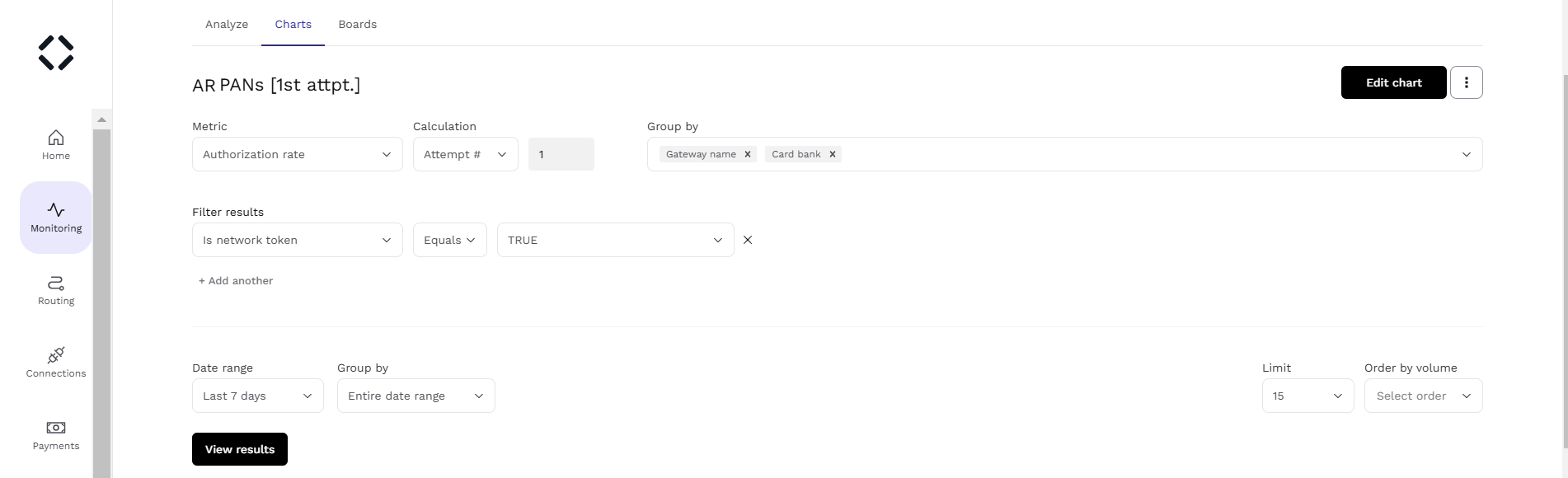
Network Token performance can be monitored through customized charts by focusing on transactions where the Is network token property is set to TRUE. For accurate tracking, the charts should analyze authorization rates of initial authorization attempts, as these are the instances where network tokens are utilized. This approach ensures measurement of NT performance by excluding subsequent authorization attempts that do not involve network tokens.
Updated 29 days ago